

Imagine you need to reschedule tomorrow's flight. You call the airline and ask, “Can I still move my flight?”
Then nothing happens for a second.
You know you're talking to an AI, but the silence makes the interaction feel broken. People expect a response to start quickly in conversation. Voice agents that leave long gaps between turns feel unnatural, even when the answer itself is correct.
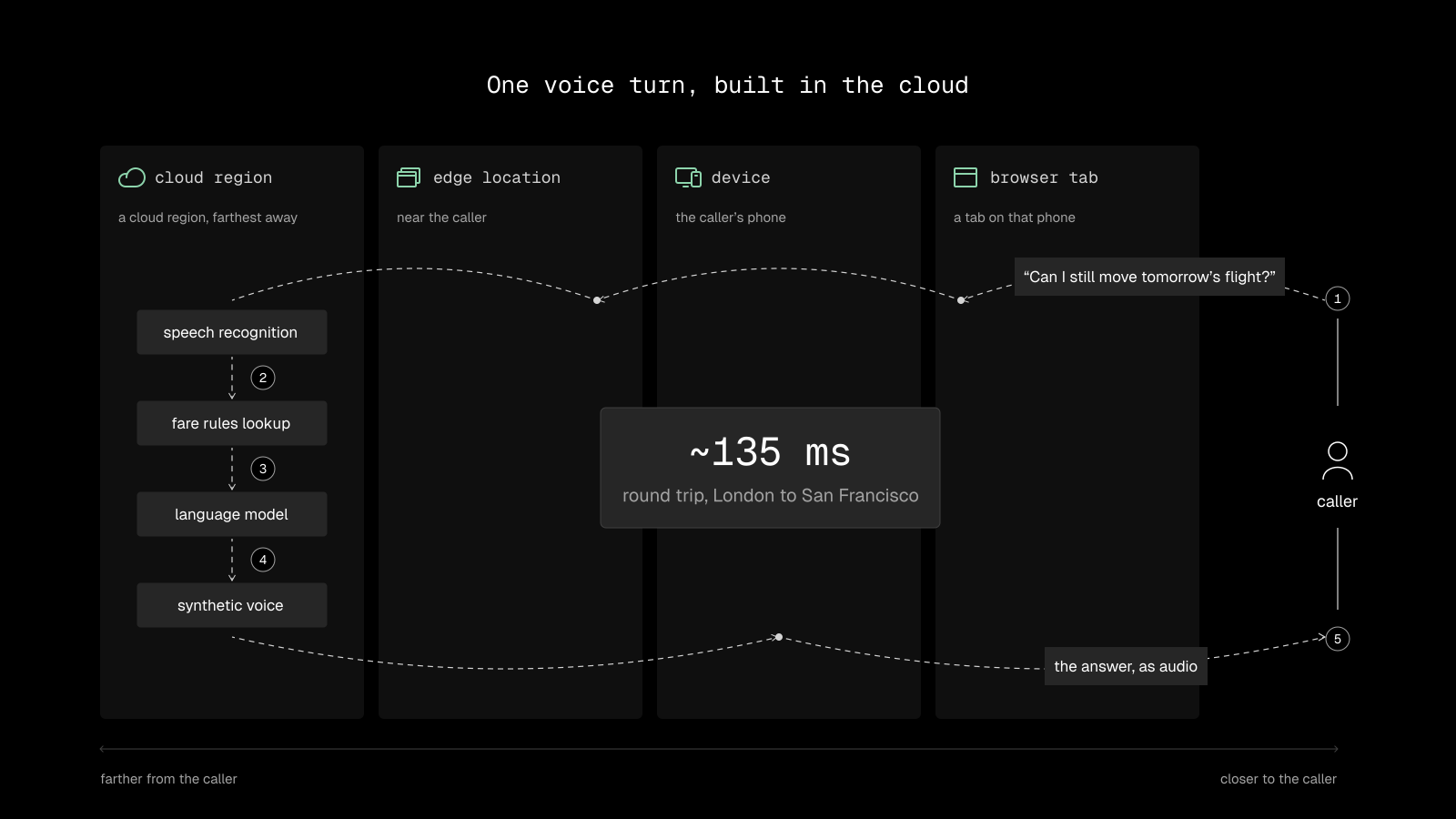
Part of the problem is architectural. Speech recognition, the language model, voice synthesis, and knowledge retrieval may all run in separate services. Each network round trip adds time, and those delays accumulate over the course of a conversation.
That raises a question for anyone building an AI application: which parts of the system actually need to run in the cloud?
Depending on the application, you can run AI in a centralized cloud, on servers near your users, directly on their devices, or inside a browser. Each option comes with different trade-offs. Increasingly, the decision isn't about picking one place for everything. It's about deciding where each component makes the most sense.
Cloud AI: Easy to Build, Hard to Make Fast
The cloud is where many AI applications start. Hosted speech recognition, language models, and voice synthesis make it possible to build a working voice agent without managing GPUs or optimizing models for different devices.
You get access to powerful models, infrastructure that scales with demand, and a relatively straightforward development process. Your application doesn't depend on the compute capabilities of the user's phone or laptop.
The trade-off is the number of network trips involved.
Imagine your caller is in London and your services run in San Francisco. The round trip between the two cities alone takes about 135 ms, before any model does work. Your application may need several sequential steps to recognize speech, retrieve relevant information, generate a response, and turn it into audio.
Add a remote knowledge base to that sequence and you've introduced another dependency. Even if the search itself is fast, the request still has to travel to the database and back.
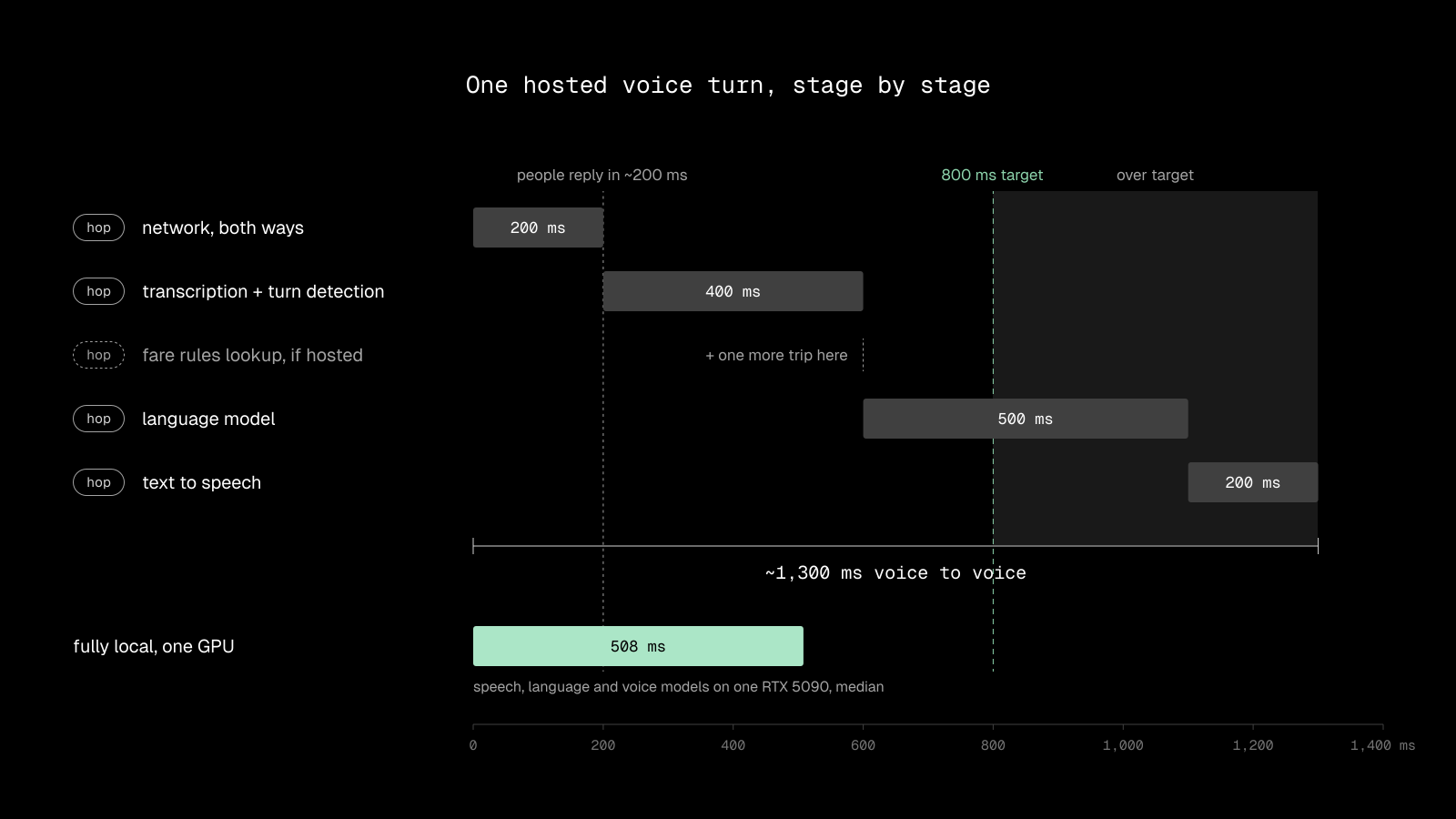
Cloud architecture also means depending on remote infrastructure and sharing data with the services that process it. Those dependencies matter when designing for privacy, availability, and predictable response times.
There are good reasons to keep large models in the cloud. Frontier models can require substantial GPU memory and compute, well beyond what's available on a typical phone or browser. Applications that need advanced reasoning may have little choice but to use centralized infrastructure for at least part of the workload.
The question is what else needs to make the trip.
Edge AI: Closer to Users, Still Connected
Edge computing moves workloads from a distant data center to infrastructure closer to the user. For applications that need a fast response but still require server-side compute, that can make a meaningful difference.
A voice agent running on a server near the caller avoids some of the distance involved in sending every request to another continent. Edge infrastructure can also handle routing, caching, and lightweight processing before a request reaches a larger model.
But moving the agent closer doesn't automatically move its dependencies.
Suppose your voice agent runs at the edge, while its knowledge base remains in a centralized region. Every retrieval request still needs to travel to that database. The application may have reduced one network delay only to introduce another.
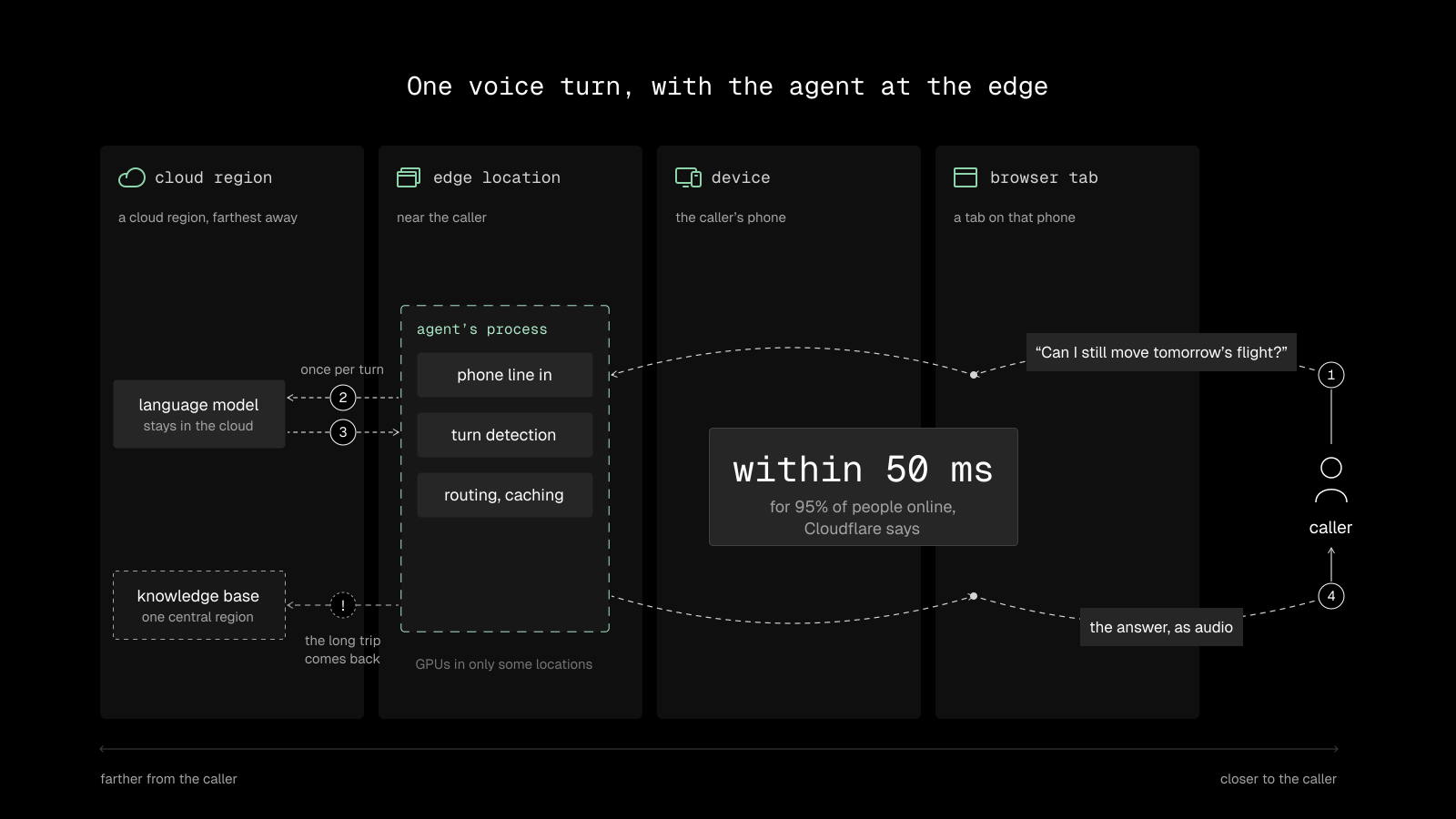
This is particularly relevant for voice AI, where the agent may need to retrieve information during every conversational turn.
Moss is designed to address that problem. With its LiveKit and Pipecat integrations, Moss search runs inside the agent's own process. The agent can retrieve the information it needs without making a separate network request to a remote search service.
The edge still depends on connectivity, and distributed infrastructure has its own availability and operational challenges. But keeping retrieval alongside the agent removes one avoidable dependency from the request path.
On-Device AI: Local Execution, Real Constraints
Now imagine the same conversation happens inside the airline's mobile app instead of over a phone line.
The phone can handle more of the work itself. Speech recognition can run locally, a smaller language model can generate a response, and a local search engine can retrieve the relevant fare rules without sending a request over the internet.
The benefit is straightforward: local operations don't need a network round trip. Sensitive information can remain on the device, and features designed to work locally can continue functioning without a connection.
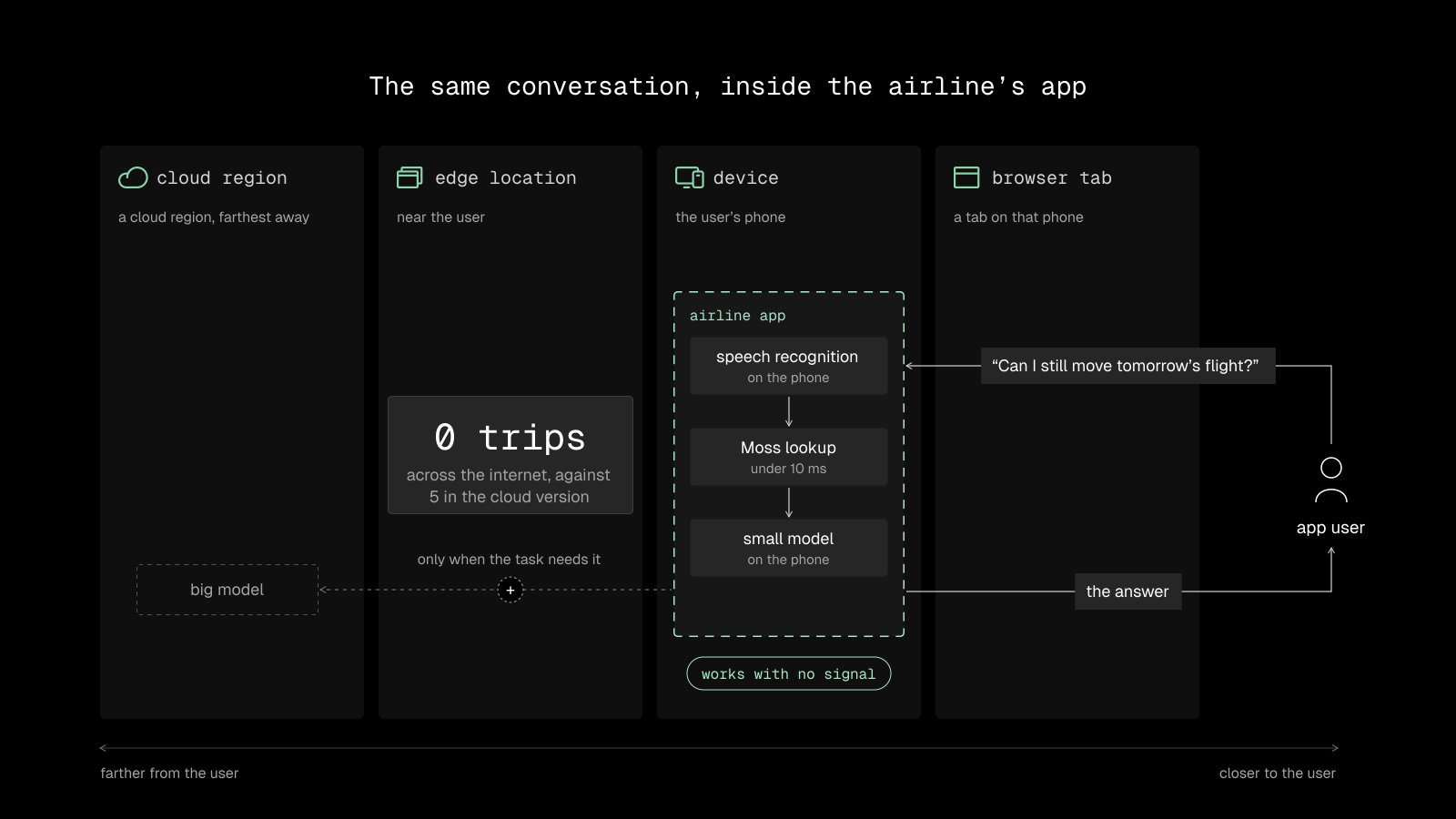
Moss supports this approach by allowing developers to run search directly in their mobile applications. Its index can live in the same runtime as the rest of the application, rather than depending on a remote vector database for each query.
There are limits. A phone has finite memory, compute, storage, and battery life. Smaller models can be useful for focused tasks, but they won't replace the largest models for every workload. An application that needs cloud inference, account data, or live information will still need connectivity for those operations.
On-device AI also requires access to the user's application. It doesn't help a voice agent handling a regular telephone call, because that caller's voice never passes through your mobile app.
For applications where local execution is practical, though, the benefits extend beyond speed. You gain more control over where processing happens and how much the application depends on remote services.
Browser AI: No Install, Your Visitor's Hardware
The browser offers another way to run AI close to the user, without asking them to install a native application.
A website can run certain models directly in the page using technologies such as WebGPU, which provides access to compatible graphics hardware, or WebAssembly, which allows compiled code to run in the browser.
Once the required assets are available, local operations can run without sending every request to a server. The trade-off is that you inherit the visitor's hardware, browser compatibility, memory limits, and download constraints.
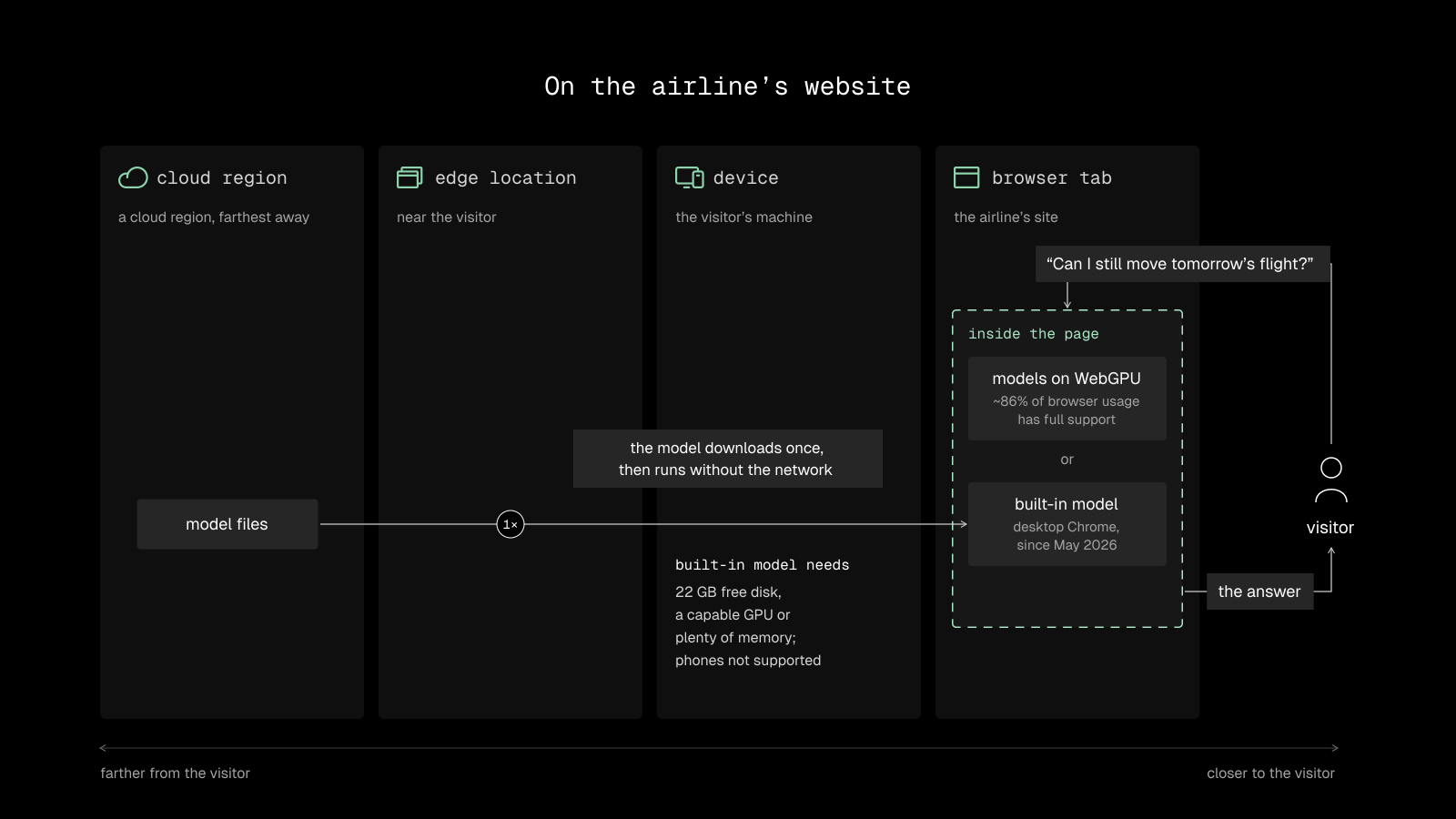
Running a large language model in the browser isn't practical for every application. Lightweight processing and search, however, can be much more accessible.
Moss supports browser search through WebAssembly. That lets a website search its own indexed content directly in the visitor's tab without requiring a dedicated GPU or a remote database call for each query.
This is useful when you want to make information available instantly within a website, or when you want to reduce the number of services involved in answering a user's question.
Browser execution isn't automatically offline from the moment a page loads. The application must first obtain the code, model files, and index it needs. Once those are available, local operations can continue without a network connection, provided the rest of the workflow doesn't depend on remote services.
For developers building web-based AI experiences, that creates another option between shipping a native application and sending every operation to the cloud.
Where Should Each Part of Your AI Run?
Cloud, edge, on-device, and browser AI solve different problems. The right choice depends on the workload, the user's environment, and the trade-offs you're willing to make.
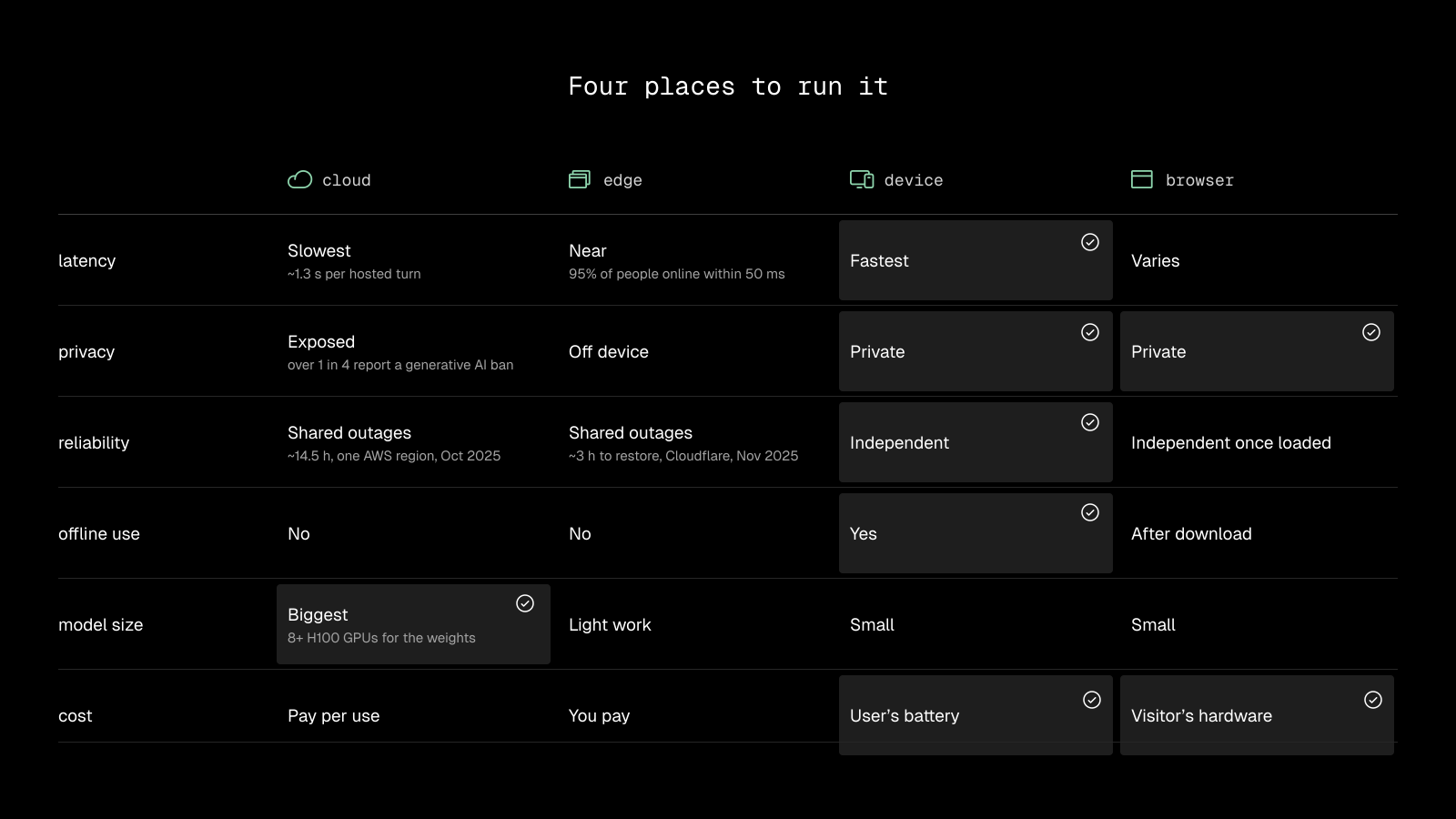
These approaches can be combined. A production application might use a cloud model for complex reasoning, an edge server for request handling, and local retrieval to avoid a separate network call each time the model needs context.
That hybrid approach is often more practical than trying to run the entire application in one place.
We Built Moss for the Lookup on Every Turn
Retrieval is one of the operations worth looking at closely because it often happens repeatedly throughout an AI interaction.
An agent needs context to answer a question. It searches a knowledge base, retrieves relevant information, and passes that information to the model. If the search happens in a separate service, every lookup introduces another network dependency.
Moss is a search engine designed to run inside your agent's own process. There's no separate vector database to call for each query. The index sits in memory alongside the agent, whether that agent runs on a server, an iPhone, or in a browser tab.
On a modest 2-vCPU machine, Moss reports that a short query takes under 5 ms end to end, including embedding. The SDK doesn't send the query to Moss.
The index can be built and versioned in the cloud, then shipped to the environment where the agent runs. That keeps the work of preparing the index separate from the work of searching it.
Moss provides SDKs for Node.js and Python on servers, Swift and Kotlin for mobile applications, and WebAssembly for the browser. It also integrates with agent frameworks and voice infrastructure such as LiveKit, Pipecat, and ElevenLabs.
The point isn't that every part of an AI application should run locally. Large models still have a place in the cloud, and some workloads will always need remote services.
It's that the search step doesn't necessarily need to make another trip across the network.
Hear It for Yourself
The voice agent on this page runs on Moss and retrieves information during the conversation.
Try asking:
- “How do I cut voice AI lag?”
- “Do I still need a vector database?”
- “How does edge search work?”
- “What's Moss's pricing?”
Building your own agent? Start with the Moss documentation or explore the published benchmarks to see how local search performs.
Founding Agent also lets you put a Moss-powered voice agent on your own website.
Where your AI runs shapes the experience your users get. And sometimes, the biggest improvement comes from moving just one part of the stack.


